

Table of Contents
Video Checksum & Evidence Authenticity
A checksum is a unique fingerprint generated from a file's contents. If even a single byte of the file changes, the checksum completely changes. This makes checksums ideal for proving that video evidence has not been tampered with.
TetherX automatically generates SHA1 checksums for all recorded video, allowing you to verify the authenticity of downloaded footage.
Why Checksums Matter
When presenting video evidence in court or to insurance companies, you may need to prove:
- The video has not been edited or altered
- The video came from a specific camera at a specific time
- The chain of custody is intact
TetherX checksums are calculated at the time of recording and stored in the cloud. This means we can independently verify that any downloaded video matches the original recording.
Finding the Checksum
- Go to the Events page
- Click on the event you want to verify
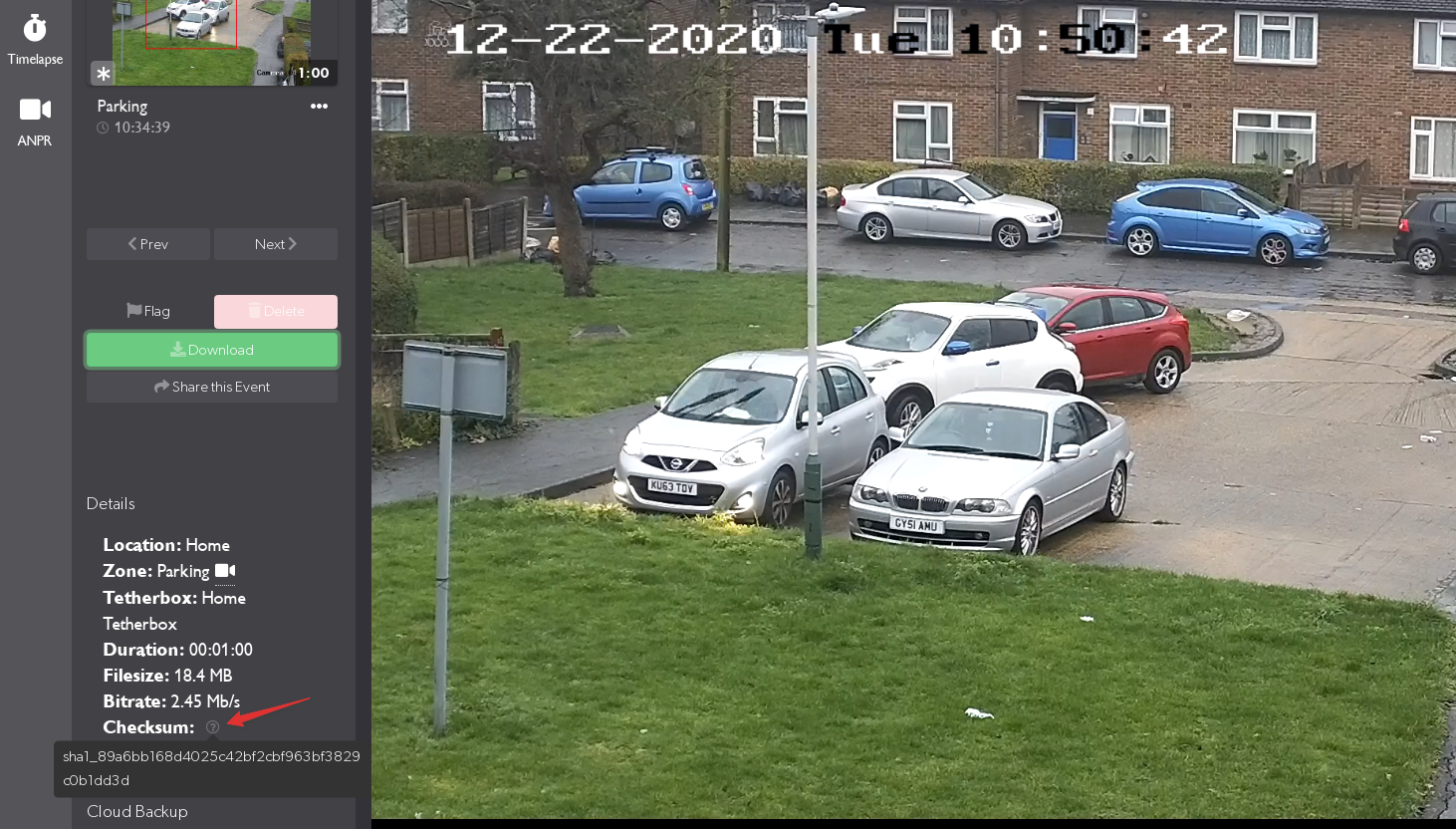
- Hover over the question mark icon next to the video details
The checksum is displayed along with other metadata (duration, file size, bitrate).
Verifying a Downloaded Video
After downloading a video, you can verify it matches the original by calculating its checksum locally.
Windows (Command Prompt)
- Open Command Prompt (press
Windows + R, typecmd, press Enter) - Navigate to your Downloads folder:
cd %USERPROFILE%\Downloads
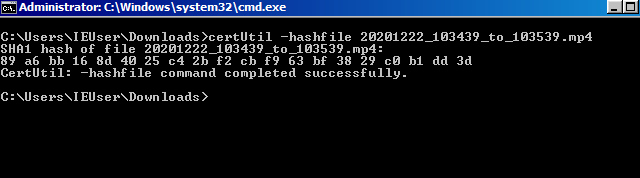
- Calculate the SHA1 checksum:
certUtil -hashfile filename.mp4 SHA1
Replace filename.mp4 with your actual video filename.
Windows (PowerShell)
Get-FileHash -Algorithm SHA1 filename.mp4
Mac / Linux (Terminal)
shasum -a 1 filename.mp4
Comparing Checksums
If the checksum you calculate matches the checksum shown in TetherX, the video is verified as authentic and unmodified.
Example of matching checksums:
- TetherX shows:
89 a6 bb 16 8d 40 25 c4 2b f2 cb f9 63 bf 38 29 c0 b1 dd 3d - Your calculation:
89 a6 bb 16 8d 40 25 c4 2b f2 cb f9 63 bf 38 29 c0 b1 dd 3d
If the checksums match, the video is authentic.
Example of non-matching checksums:
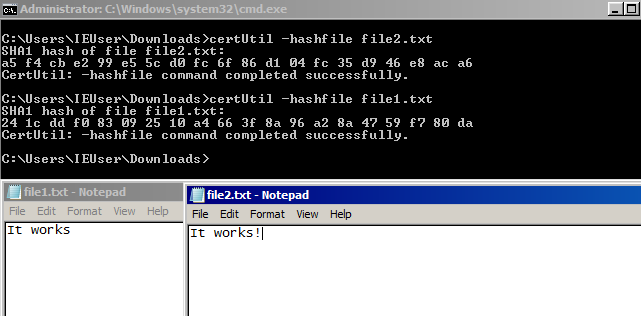
If the checksums don't match, either:
- The file was modified after download
- The file was corrupted during download
- You're checking the wrong file
For Legal Proceedings
If you provide TetherX with a checksum (or even the video file itself), we can confirm:
- The video has not been tampered with - We can verify the checksum matches our records
- The exact start and end time - We store precise timestamps for all recordings
- Who viewed and downloaded the video - Our Audit Log tracks all access
Tip: For forensic evidence requests, contact us about our extraction service. We provide footage with SHA1 checksums backed up in the cloud to verify the evidence has not been tampered with.
Timestamp Reliability
All TetherX timestamps are reliable for legal evidence. TetherBoxes automatically synchronise camera clocks, ensuring accurate timestamps across all cameras regardless of manufacturer.
Related Articles
- Events - Find and download video footage
- Audit Log - Track who accessed footage
- TetherBox Time Synchronisation - How TetherX ensures accurate timestamps
Referenced in: